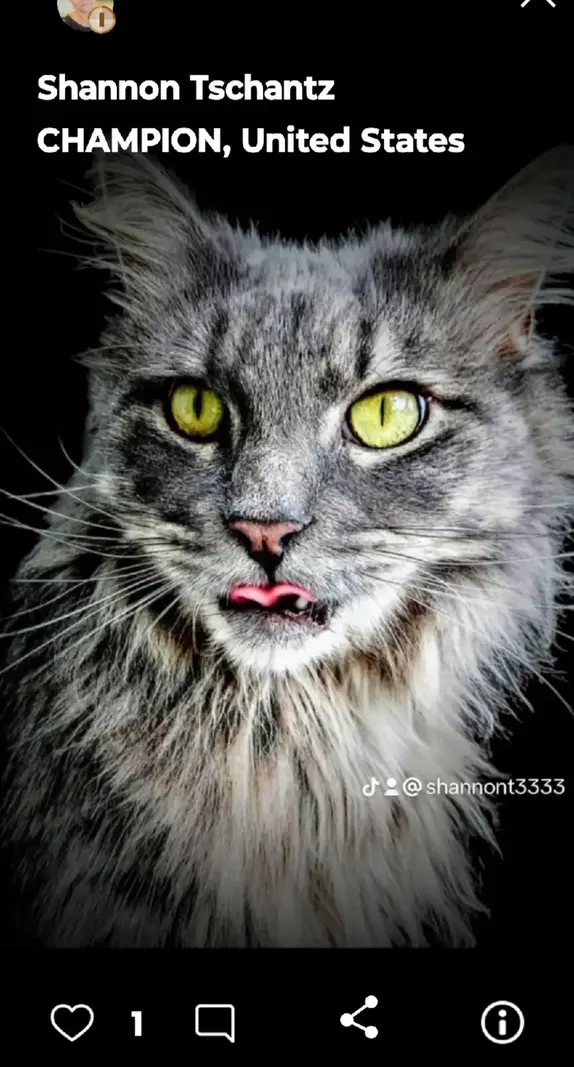
A bold, characterful cat portrait with a great tongue‑flick moment.
“Babes” fits the attitude here — this is a tight animal portrait that leans towards wildlife/pet portraiture. The strong black background isolates the cat cleanly and the little curl of tongue gives the frame its moment. I suspect your goal was to showcase personality through detail and expression, and you’ve achieved that. The image’s strengths are the sharp eyes and the expressive mouth; the main weaknesses are the crop (crowded ears) and some punchy processing on the eyes and fur that feels a touch heavy. How intentional was the tightness at the top — did you want that intensity, or did the frame simply run out of space?
TECHNICAL EXECUTION ★★★★
Focus is excellent on the eyes and muzzle, with crisp whiskers and good micro‑detail in the fur. Exposure is under control and noise looks minimal; the black background is clean without muddy artefacts. Processing appears a bit aggressive around the irises and fur edges — slight halos and very intense yellow push the image toward “crunchy.” Dialling back clarity/texture locally would let the natural coat look more believable. For five stars I’d like subtler colour in the eyes, gentler micro‑contrast on the fur, and completely neutral edges where fur meets background.
COMPOSITION ★★★
The centred headshot keeps attention where it belongs, and the dark background removes clutter. However, the ears are cramped, with the right ear touching the frame, which makes the cat feel boxed in; a little more headroom would add dignity. The generous whiskers press close to the left edge too, increasing that crowded feel. The multiple on‑image texts/watermarks are significant distractions in a portrait like this. To reach four or five stars, give 10–15% more space above and to the sides, or place the eyes on an upper third with a hint of negative space for the whiskers to breathe — and present a clean, text‑free frame for portfolio use.
LIGHTING ★★★★
Soft, directional light sculpts the muzzle nicely and creates attractive catchlights that bring the eyes alive. The black background helps the cat’s shape separate well, and the tonal roll‑off across the face has depth. Highlights on the nose and the nearer cheek verge on hot, and the far cheek sinks a little too deep into shadow, losing some texture. A small white card/reflector opposite the key light would lift that side without flattening. For five stars I’d want slightly more balance in those shadows and highlights while keeping the drama.
STORY ★★★
The tiny tongue flick is the moment — playful and slightly cheeky — and it gives the portrait personality beyond a standard pet headshot. Beyond that, the story is thin because all environmental cues are removed; it’s a studio‑style character study rather than behaviour. Consider building on this by catching a grooming lick, a mid‑meow, or an interaction that hints at the cat’s routine or quirks. What behaviour could you wait for that says something unique about this animal?
IMPACT ★★★★
The piercing yellow eyes against silvery fur and a black field make a strong, immediate impression. The tongue detail adds memorability. The heavy colour in the eyes and the crowded crop hold it back from being truly striking, and the visible text overlays reduce presence. With cleaner processing, more breathing room, and a distraction‑free presentation, this could step up a level.
CONSTRUCTIVE NEXT STEPS
✓ Reframe to include full ear tips and a touch more space for the whiskers — about 10–15% more headroom and side room; consider placing the eyes on the upper third rather than dead centre.
✓ Tone down eye treatment: reduce yellow saturation by ~15–25% and pull back clarity/texture on fur by ~10–15% using a masked adjustment to avoid crunchy edges and halos.
✓ Add a small white reflector/card 30–50 cm opposite your key light to open the shadowed cheek; aim for 1/250s, f/3.5–f/4, ISO as needed to freeze subtle head movement.
✓ Present a clean master without on‑image text or watermarks for portfolio/print; if needed, place credits in the caption or a subtle border instead.
AI Version 2.0