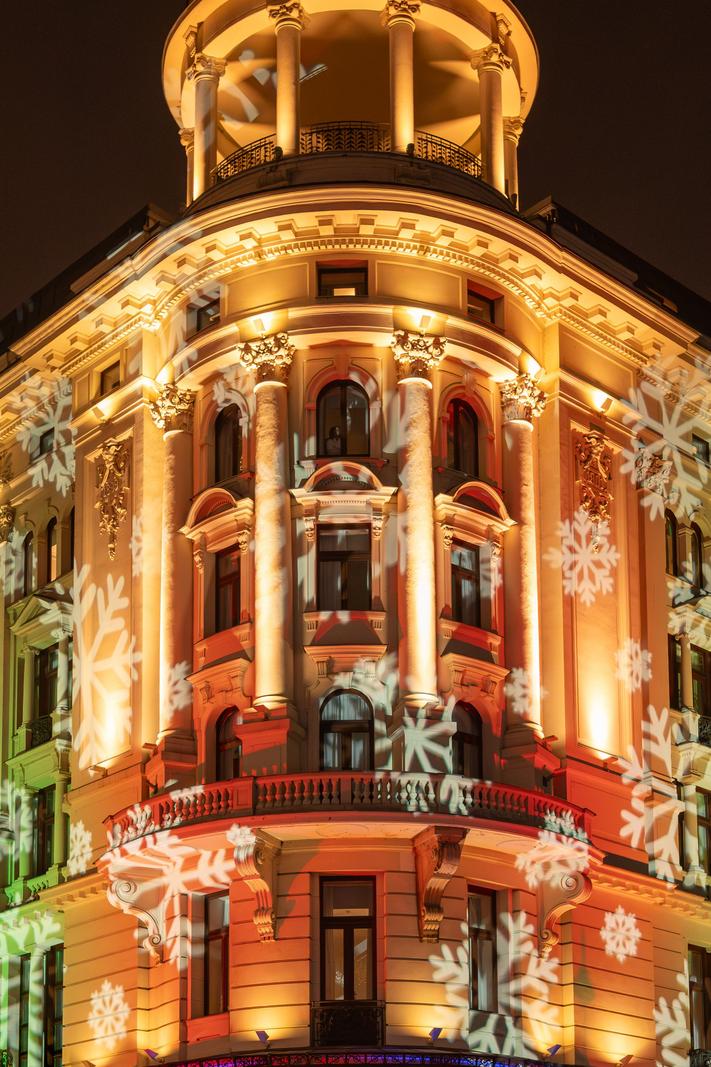
A grand corner façade with festive projections — bold, eye‑catching, and neatly executed at night.
PHOTOGRAPHER SAID: Post prodution to earlier picture
Thanks for sharing this new version, Piotr. The processing looks warmer and punchier than a straight file would be, which suits the celebratory snowflake projections and brings out the sculptural detail. This reads primarily as architectural photography with a travel flavour. The edit largely holds together, but the stronger the processing, the more it spotlights fundamental capture issues like perspective control. What were you aiming to change from the earlier image — colour balance, contrast, or correcting geometry?
TECHNICAL EXECUTION ★★
The file appears sharp, with good detail in the columns and cornices, and noise is well controlled for a night scene. Exposure is balanced enough that the uplighters don’t clip excessively while the shadows still hold information. However, there is strong keystoning: the verticals converge and the building feels as if it’s falling away, which is a core technical standard in architectural work. The warm colour grade pushes towards orange in the midtones; it’s not garish, but it does nudge realism. To reach ★★★★★ you’d need corrected verticals (in-camera with a shift lens or in post via Transform) and a more neutral, restrained colour balance that keeps the stone believable.
COMPOSITION ★★★
The corner viewpoint is a good choice, using the curve and the four columns as a clear focal structure. The frame is broadly centred and stable, which suits the symmetry of the façade. That said, the top feels tight and the lower balcony is pressed against the edge; a little more breathing room would help the architecture sit with authority. The blue strip of signage along the very bottom edge pulls the eye and competes with the warm palette. Would stepping back or using a slightly wider focal length have allowed you to include the full crown and then crop cleanly above the neon?
LIGHTING ★★★
The building illumination and the projected snowflakes create an immediate seasonal atmosphere. Warm uplighting reveals depth in the mouldings, and the projections add texture without blowing out completely. Mixed colour temperatures (warm architecture, cooler white snowflakes) are handled fairly well, though some hotspots on the columns become a little glossy. A touch more control—either by timing the exposure when the projection is at its gentlest, or by slightly pulling highlights locally—would give the stone more texture. Truly top-tier lighting here would sculpt the forms while keeping whites neutral and crisp.
STORY ★★★
The picture communicates “holiday city at night” clearly; the snowflake patterns make the message immediate. Beyond that, there’s little to anchor time or life—no people at windows, no passer-by, no momentary element. As a result the frame functions more as a decorated-building record than a lived scene. Consider whether a human presence or passing traffic trails could add scale and a sense of place. What small moment could you wait for that would make this feel like a night in a real city rather than a static façade?
IMPACT ★★★
The grandeur of the architecture and the festive overlay deliver quick visual appeal. The uncorrected perspective and tight crop, however, keep it from feeling polished or memorable. Many city façades are photographed like this at Christmas; to stand out you’ll need either cleaner geometry or a distinctive moment. With refined perspective and a subtle colour grade, the same scene would land harder and feel more deliberate. That step up in control would push this toward publication-level impact.
CONSTRUCTIVE NEXT STEPS
✓ Correct perspective: in Lightroom use Lens Corrections (enable profile) then Transform > Vertical (or Guided) to straighten the columns; leave a hint of convergence only if it’s a conscious stylistic choice.
✓ Give the frame breathing room: step back or go a touch wider to include the full crown and a cleaner base, then crop to eliminate the blue neon strip or clone/heal it out if stepping back isn’t possible.
✓ Tame the warmth and hotspots: reduce Orange saturation/luminance slightly in HSL and use a local adjustment to pull highlights on the brightest columns to recover surface texture.
✓ Consider adding life: wait for a silhouetted passer-by, someone at a window, or a single car to add scale; keep shutter around 1/10–1/2s if you want subtle light streaks without drowning the façade.
AI Version 2.11